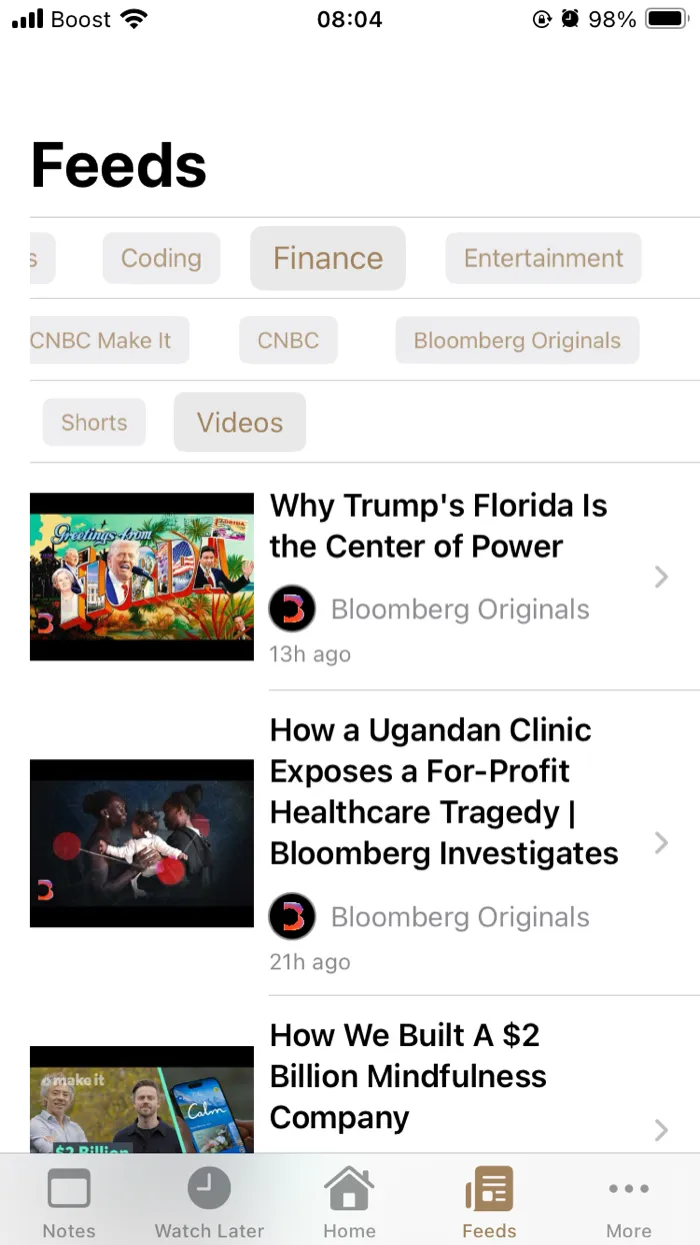
YouTube Shorts filter for iPhone
Block YouTube Shorts on iPhone
Hide the Shorts shelf with one tap and go back to the channels you actually chose.
End doom-scrolling today
iOS 17+ · Version 5.3.2
Why Shorts are hard to stop
Shorts are built to be the next thing. A short vertical video ends, another starts, and there is no natural place to stop. That is the design, not a personal failing.
We are not going to pretend a filter fixes willpower. ZenTube removes the Shorts shelf from the feeds you browse, so the cue is not sitting in front of you when you open the app.
One tap hides Shorts
The Shorts filter lives where you watch. It takes one tap in the Feeds tab and one tap in the Home tab.
- Open the Feeds tab and tap the Shorts button above the videos.
- On the Home tab, open the filter icon and choose “Shows videos only”.
- Keep browsing your channels. The Shorts are filtered out of the feed.
See the full Shorts filtering steps in the ZenTube help guide
Shorts filtering is part of the premium version.
What changes
With the Shorts filter on, the app behaves differently:
- Shorts are removed from the feeds you browse in ZenTube.
- You see videos from the channels you follow, grouped into the categories you created.
- Search and explore are still there when you deliberately want them.
- YouTube itself is unchanged. ZenTube is a separate client, not a system-wide blocker.
Who it’s for
If you want to watch the channels you chose without the Shorts shelf pulling you into a scroll, ZenTube is built for that. It can suit students, people doing focused work, and anyone who wants fewer Shorts in their day.
It is not a parental-control tool and it does not block YouTube at the network level. It changes what this app shows you, and that is the whole point.
Frequently asked questions
- Does ZenTube block all Shorts?
- It filters Shorts out of the feeds you browse in ZenTube, including the Home and Feeds tabs. It does not change the YouTube app or website, so Shorts still exist if you open them there.
- Does it work on iPad?
- Yes. ZenTube runs on iPhone and iPad, and it can also be installed on an Apple Silicon Mac.
- Is it free?
- ZenTube is free to download with in-app purchases. Shorts filtering requires the premium version, which includes a 30-day trial.
Sounds good?
Download Now.